.png) NOTE:
MS-CAN (CANbus) functionality is not available with initial release.
The GenStar MPPT provides several communication options. The GenStar MPPT uses a proprietary protocol for the MS-CAN network and the non-proprietary open standard MODBUSTM and MODBUS TCP/IPTM protocols for RS-232, EIA-485, and Ethernet networks. Additionally, HTTP and NTP are supported for web page and real-time clock support.
Hardware and third party software that supports the MODBUS protocol can be used to communicate with a GenStar MPPT.
The GenStar MPPT controller includes several communications ports as shown in Figure 18.
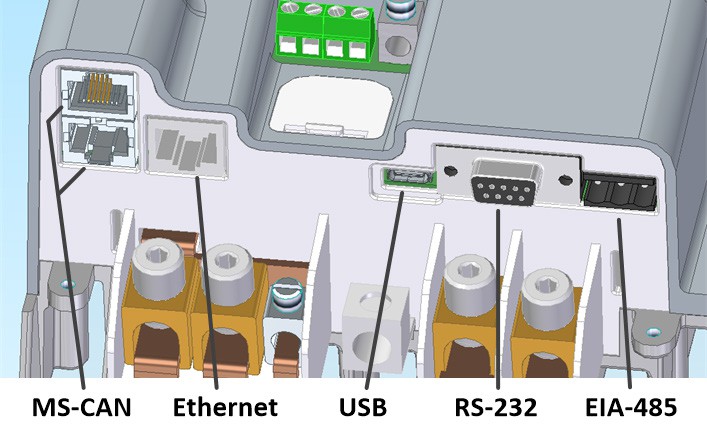
Figure 18. Communication Ports on the Genstar.
Table 12 provides a summary of supported features for each communication interface.
USB-C | RS-232 | EIA-485 | Ethernet | ||
Connect a GS-MPPT to other Morningstar devices | • | ||||
Connect multiple GS-MPPT together in a network | • | • | • | ||
Update firmware | • | • | • | ||
Modbus communications | • | • | • | ||
LiveView web app: View data, change settings, update firmware | • |
Table 12. Communications Summary.
Multiple communication ports can be used simultaneously - note that the USB-C, RS-232, and EIA-485 connections share hardware, and therefore cannot be used simultaneously. For example, a GenStar MPPT controller can use Ethernet and a EIA-485 with a router to be connected with a Local Area Network (LAN) and the Internet simultaneously.