Connect to the GenStar MPPT via an Ethernet network (LAN/WAN) or connect the controller directly to a PC using an Ethernet cable. Use CAT-5 or CAT-5e twisted pair Ethernet cables with RJ-45 connectors. A network diagram for both scenarios is shown in Figure 20.
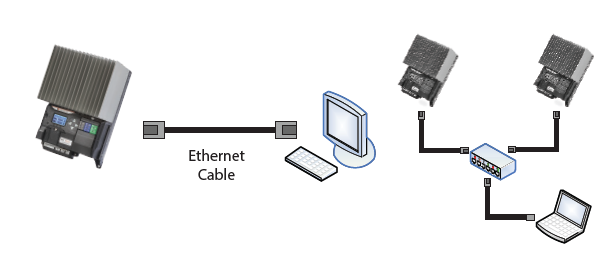
Figure 20. Ethernet Network Diagrams.
Factory Default Network Settings | |
|---|---|
DHCP | Enabled |
LiveView Web Address | http://gsmppt + serial number1 |
IP Address | 169.254.x.y (with no acknowledgement from the DHCP server) |
Subnet Mask | 255.255.255.0 |
Gateway | 192.168.1.1 |
Primary DNS Server | 169.254.1.1 |
MODBUS TCP/IPTM Port | 502 |
MODBUS TCP/IP HTML | 80 |
1 The LiveView web address is unique to each controller. If the GenStar MPPT serial number is 09501234, then the GenStar MPPT's LiveView address is: http://gsmppt09501234. For reference, the LiveView web address is printed on the serial label on the side of the unit.
The controller's MAC Address is located on the serial label on the side of the controller.
Two (2) LEDs on the Ethernet jack indicate link and activity status.
Condition | Green LED | Yellow LED |
Network Connection OK | ON | OFF |
Network Activity | ON | Blinking |
Error | OFF | ON |