The Commands menu provides controls to take action. The type of command cards available/visible on the page will depend on the product and configuration.
Access to the Commands page requires the Installer Password. See section 3.6 Installer Access for instructions.
ReadyEdge Commands Page
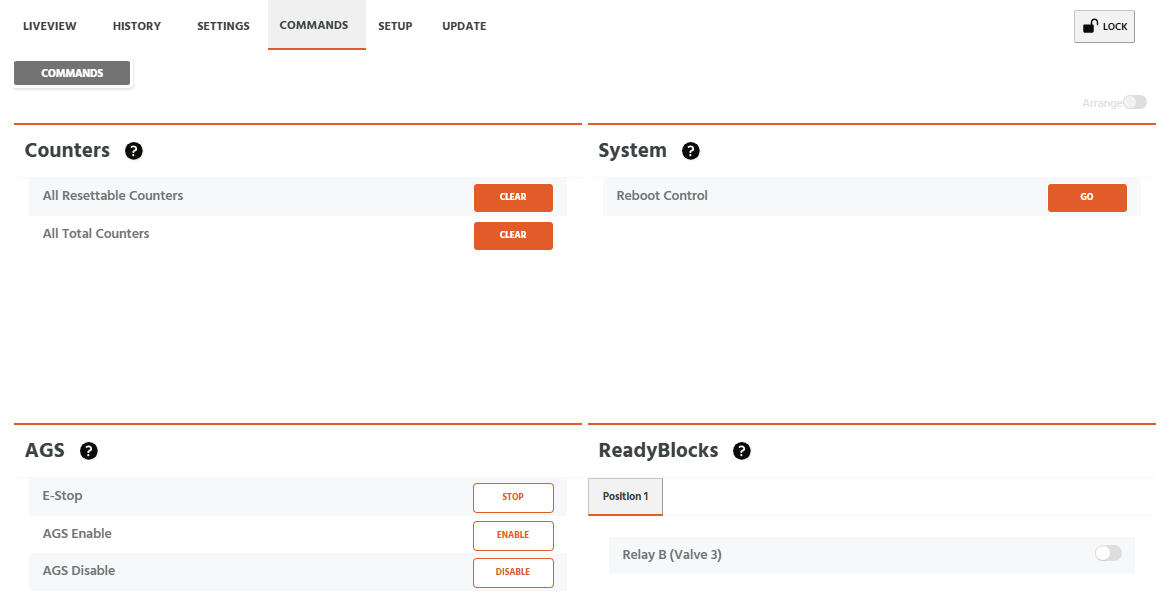
Counters Commands Card
Visibility: Always Visible
All Resettable Counters
Clears the Resettable Amp-hour (Ah)and Resettable kilowatt-hour (kWh) counter values to zero. Resettable counters are intended to track short-term energy accumulation. For example, accumulations since a battery replacement, or a new load was added to a system.
All Total Counters
Clears the Total Ah and Total kWh counter values to zero. Total counters are intended to track long-term / lifetime accumulations of a system.
System Commands Card
Visibility: Always Visible
Reboot Control
Software resets the device. All device functions will cease until the reboot is complete.
NOTE: In the case of the ReadyEdge, all Connected Products will remain powered and operational. Only the ReadyEdge will reboot.
AGS Commands Card
Visibility: Visible when Automatic Genstart Enabled & Configured
E-Stop
Stop the generator immediately - override all automatic control. Remains in the stop/off state until E-Stop toggled off.
AGS Enable - Visible when AGS Mode = AGS Basic or AGS Advanced
Override AGS automatic control and force the generator ON immediately (while still taking into account the Timing Controls: max runtime and min off time)
AGS Disable - Visible when AGS Mode = AGS Basic or AGS Advanced
Override AGS automatic control and force the generator OFF immediately (while still taking into account the Timing Controls: max runtime and min off time)
Manual Generator Control (Enable/ Disable) - Visible when AGS Mode = Manual
Manually turn the generator on/off while still taking into account the Timing Controls (max runtime and min offtime for Enable; min runtime for Disable).
ReadyBlocks Commands Card
Visibility: Visible when (1) or more ReadyRelays are configured for Commands/Schedule control
Relay N (custom name)
ReadyRelays that have been assigned the Command/Schedule function can be toggled ON-OFF manually with the slider switch