SAVE THESE INSTRUCTIONS.
This manual contains important safety, installation, operating and maintenance instructions for the GS-MPPT-60M-200V, GS-MPPT-80M-200V, GS-MPPT-100M-200V. For safety purposes, these instructions must be followed during installation, operation and maintenance of the GenStar MPPT solar controller.
The following symbols are used throughout this manual to indicate potentially dangerous conditions or mark important safety instructions:
WARNING:
Indicates a potentially dangerous condition. Use extreme caution when performing this task.
CAUTION:
Indicates a critical procedure for safe and proper operation of the controller.
NOTE:
Indicates a procedure or function that is important to the safe and proper operation of the controller.
Safety Information
Read all of the instructions and cautions in the manual before beginning installation.
There are no user serviceable parts inside the GenStar MPPT. Do not disassemble or attempt to repair the controller.
No power or accessory terminals are electrically isolated from dc input, and may be energized with hazardous solar voltage. Under certain fault conditions, battery could become over-charged. Test between all terminals and ground before touching.
External solar and battery disconnects are required.
Disconnect all sources of power to the controller before installing or adjusting the GenStar MPPT.
There are no fuses or disconnects inside the GenStar MPPT. Do not attempt to repair.
Installation Safety Precautions
The GenStar MPPT controller must be installed by a qualified technician, in accordance with the electrical regulations of the country of installation.
Throughout this manual, NEC guidance is provided to meet general safety requirements, and to inform of best installation practices. It is the installer's responsibility to ensure that installation complies with all local safety and code requirements.
These installation and servicing instructions are for use by qualified personnel only. To reduce the risk of electrical shock, do not perform any servicing other than that specified in the operating instructions, unless qualified to do so.
This unit is not provided with a GFDI device. This charge controller must be used with an external GFDI device as required by the Article 690 of the National Electrical Code for the installation location.
Mount the GenStar MPPT indoors. Prevent exposure to the elements and do not allow water to enter the controller.
Install the GenStar MPPT in a location that prevents casual contact. The GenStar MPPT heatsink can become very hot during operation.
Use insulated tools when working with batteries.
Avoid wearing jewelry during installation.
The battery bank must be comprised of batteries of same type, make, and age.
Certified for use in negative ground systems, or positive ground with floating array.
Do not smoke near the battery bank.
Power connections must remain tight to avoid excessive heating from a loose connection.
Use properly sized conductors and circuit interrupters.
The grounding terminal is located in the case, and is identified by the symbol below:
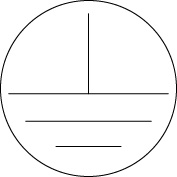
Ground Symbol
This charge controller is to be connected to DC circuits only. These DC connections are identified by the symbol below:

Direct Current Symbol
A means of disconnecting all power supply poles must be provided. These disconnects must be incorporated in the fixed wiring. The GenStar MPPT negative power terminals are common, and must be grounded as instructions, local codes, and regulations require. A permanent, reliable earth ground must be established with connection to the GenStar MPPT ground terminal. The grounding conductor must be secured against any accidental detachment.
Servicing of batteries should be performed, or supervised, by personnel knowledgeable about batteries, and the proper safety precautions.
Be very careful when working with large lead-acid batteries. Wear eye protection and have fresh water available in case there is contact with the battery acid.
Remove watches, rings, jewelry and other metal objects before working with batteries.
Wear rubber gloves and boots.
Use tools with insulated handles and avoid placing tools or metal objects on top of batteries.
Disconnect charging source prior to connecting or disconnecting battery terminals.
Determine if battery is inadvertently grounded. If so, remove the source of contact with ground. Contact with any part of a grounded battery can result in electrical shock. The likelihood of such a shock can be reduced if battery grounds are removed during installation and maintenance (applicable to equipment and remote battery supplies not having a grounded supply circuit).
Carefully read the battery manufacturer's instructions before installing/connecting to, or removing batteries from, the GenStar MPPT.
Be very careful not to short-circuit the cables connected to the battery.
Have someone nearby to assist in case of an accident.
Explosive battery gases can be present during charging. Be certain there is enough ventilation to release the gases.
Never smoke in the battery area.
If battery acid comes into contact with the skin, wash with soap and water. If the acid contacts the eye, flush with fresh water and get medical attention.
Be sure the battery electrolyte level is correct before starting charging. Do not attempt to charge a frozen battery.
Recycle the battery when it is replaced.