GenStar MPPT exterior and meter features are shown in Figures 1 and 2. A brief description of each feature follows the figures.
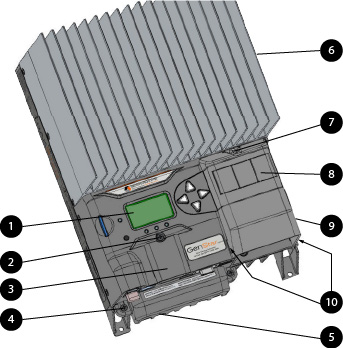
Figure 1. GenStar MPPT Exterior Features.
Exterior Features | ||
|---|---|---|
1 | Meter Display Screen | LCD read-out for setting and programming navigation |
2 | Coin Cell / Accessory Cover Screw | |
3 | Coin Cell / Accessory Cover | Plastic protective cover for accessory terminals and coin cell compartment |
4 | Power Terminal Cover Screw (1 of 2) | |
5 | Power Terminal Cover | Plastic protective cover for power terminal lugs and communication ports |
6 | Heatsink | Aluminum heatsink to dissipate GenStar MPPT heat |
7 | ReadyBlock Cover Screw | |
8 | ReadyBlock Tabs | Removable plastic protective panels for ReadyBlock installation |
9 | ReadyBlock Cover | Plastic protective cover for ReadyBlocks and ReadyRailTM |
10 | ReadyBlock Cover Clips and Anchor Hole Locations | (2) Plastic extension flanges to secure cover in molded plastic anchors |
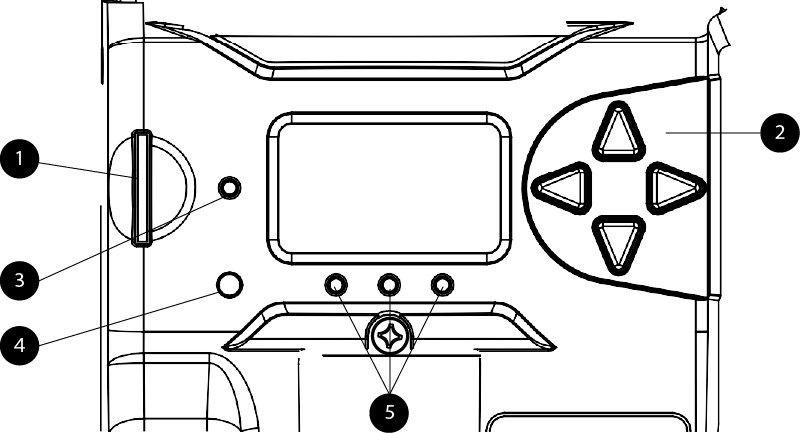
Figure 2. Meter Features
Meter Features | ||
|---|---|---|
1 | SD Card Slot | Has SD card installed. External memory card slot for saving configurations and updating firmware |
WARNING: RISK OF EXPLOSION
When loading a system image configuration from an SD Card, ensure that the destination device has the same system voltage, battery profile, and RTS; otherwise, there is a potential risk of system damage or bodily injury.
Meter Features | ||
|---|---|---|
2 | Meter Directional Buttons | Meter navigational controls |
3 | Charging Status LED | Unit Charging State and Fault and Alarm indicator |
4 | Programmable Soft-key | Push-button control for command activation |
5 | State-of-charge LEDs | Approximate battery state-of-charge indicators. |
NOTE:
Indicator becomes more precise when ReadyShunt or Ready BMS is installed.