The ReadyEdge is programmed with a default configuration out of the box for up to two devices connected through MeterBus.
No further configuration is needed if these settings are sufficient.
Sections 3.2 - 3.5 detail the user interfaces and how to connect to each.
Skip to section 4.0 Operation to learn more about ReadyEdge features and functionality.
Restore Default Settings
If there is a need to return to default configuration, there are two options.
Restore Default Communication Settings Only
Locate the small gray button labeled reset to the left of the LED Indications. This will only reset communication settings back to default.
Restore All Default Settings with a Factory Reset
Locate the small gray button labeled reset to the left of the LED Indications. Press and hold for 10 seconds.
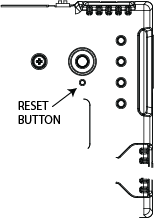
Reset Button Location