WARNING: Shock Hazard
Before wiring, verify that all system breakers and disconnect switches are in the OPEN/DISCONNECTED position, and that all fuses are removed from their holders.
Do not apply power to the ReadyEdge until all wiring has been completed per these instructions.
Avant de faire le câblage, vérifiez que tous les disjoncteurs et interrupteurs de déconnexion du système sont en position OUVERT/DECONNECTÉE, et que tous les fusibles ont été retirés de leurs supports.
Ne pas appliquer l'alimentation au ReadyEdge jusqu'à ce que tout le câblage soit terminé conformément à ces instructions.
NOTE: GROUNDING The power source for the ReadyEdge may be positive grounded, negative grounded, or floating.
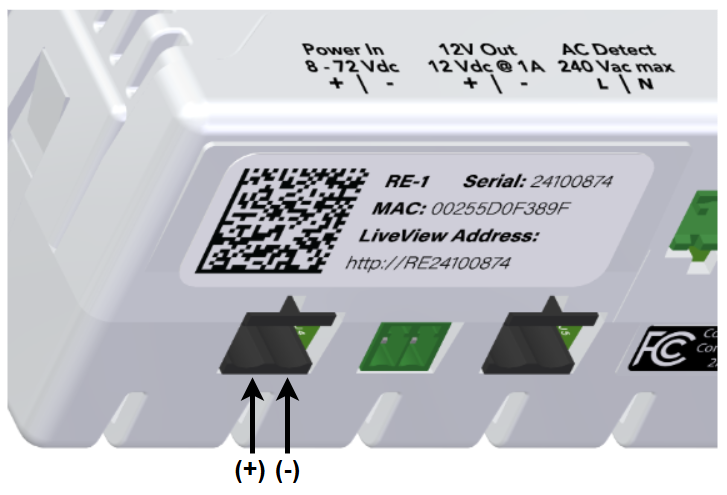
Power Input Connection location and polarity (termination plug not shown for clarity)
Use the included power cable with in-line fuse. Be sure the fuse has been removed from the holder before proceeding.
Connect the ring-terminal ends of the included power cable to the battery bank. The red wire is positive (+), the black wire is negative (-).
Connect the power cable terminal connectors to the ReadyEdge port labeled “Power In, 8-72 vdc (+/-)”. The polarity of the connection is shown in the diagram above.
The fuse will be inserted at a later step. Set it aside in a safe place for now.