Using EIA-485 versus MeterBus Port for Device Connections
For systems with TriStars, the EIA-485 port is the best choice for controller connection. This would be a Modbus over MeterBus connection, and this port can also support many third-party devices.
For other ReadyEdge-compatible devices, MeterBus is the best connection. For more than 3 devices, MeterBus with a MeterHub is the best configuration.
Compatible Charge Controllers and Inverters:
TriStar:
TriStar MPPT 600V
TriStar MPPT 150V (60A)
Tristar (60A)
Note:
TriStar and TriStar MPPT (30A and 45A models) require EIA-485/RS-232 Adapter (RSC-1) for EIA-485. See the image for 24V/48V Tristar Below.
Other Devices:
For the following devices, connection using the EIA-485 port requires the MRC-1, MeterBus to EIA-485 adapter.
SunSaver MPPT
ProStar MPPT
ProStar
SureSine 300
EIA-485 Controller Wiring
All devices on the RS-485 and MODBUS over MeterBus networks must be programmed with a unique MODBUS address. The ReadyEdge should pre-program these addresses, but with third-party devices, you may need to use LiveView to specify these addresses.
Connect A, B, and Gnd wires to the EIA-485 network
Connect A, B, and Gnd wires to the connected device, or if applicable, the adapter, and then connect the adapter to the device using a serial cable. (See Adapter Manual for specific instructions.)
For devices that require additional power, you can connect wires from the 12V out port to the wires from the EIA-485 Port.
See connected device manuals for further EIA-485 wiring and installation instructions
If you connection to the EIA-485 Port is not working, try switching the A and B Wires.
Networks requiring power can get power using an external source. The source voltage must be between 8-16 Vdc. For 12-volt systems, the network can be powered directly from the system battery or the 12V power out. For 24, 36, and 48-volt systems, use a DC-DC converter.
For Accessory wiring, see the accessory product manual.
Termination resistors may be required to prevent interference from reflected signals. If required, install termination resistors at both ends of the data bus across Data A and Data B to match the characteristic impedance of the communication cables (120Ω for EIA-485 single twisted pair, 100Ω for Category 5 Ethernet).
Examples
Example of three TriStar 60A or 600V connected to ReadyEdge
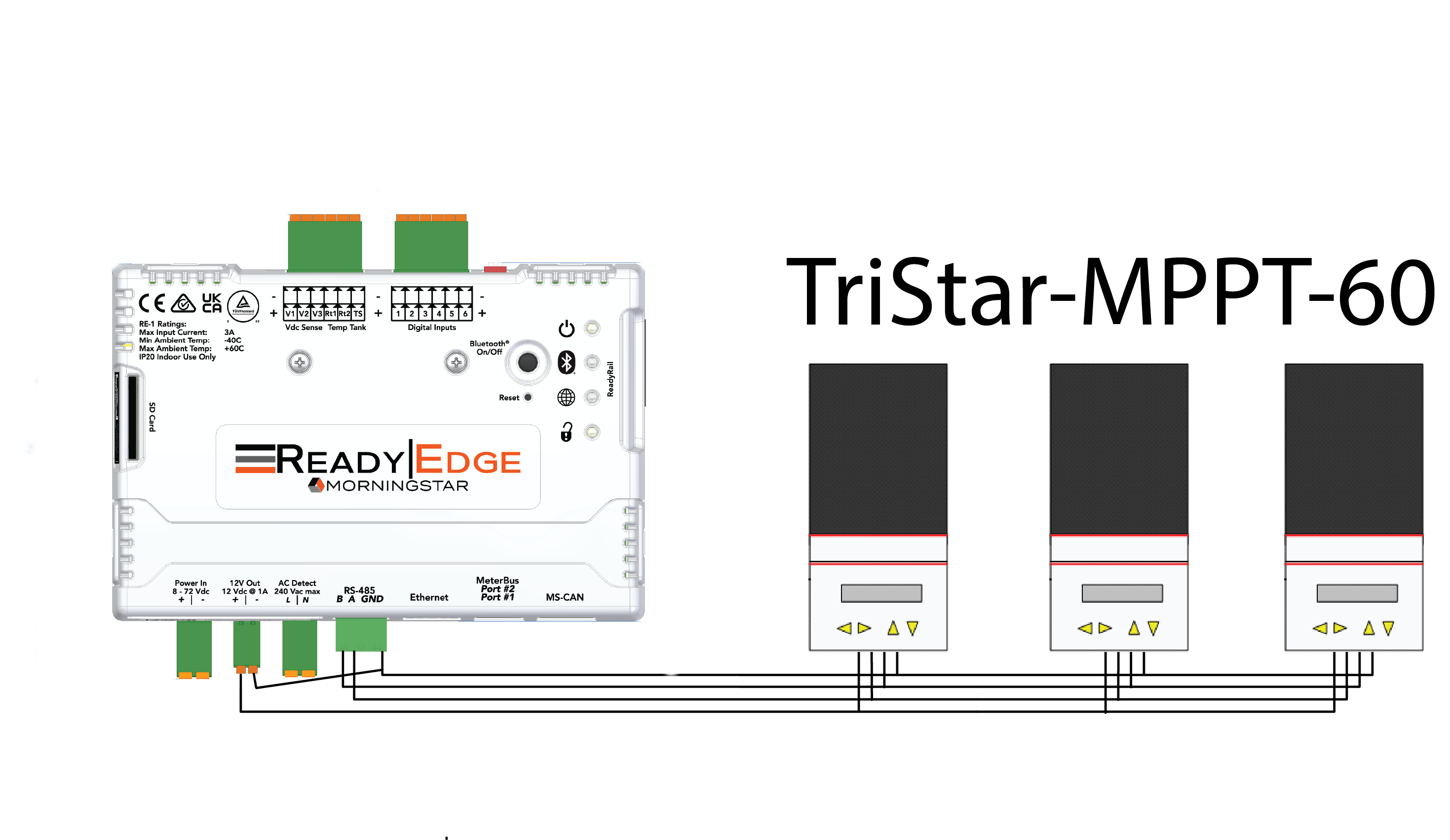
Configuration for three Tristar MPPT 60 A Models connected to the ReadyEdge using the EIA-485 Port. The TriStar MPPT (60 A) and TriStar 600V require power to function. Connecting to the 12V Out port is necessary.
Example of three Tristar 24V/48V connected to the ReadyEdge
 connected to EIA-485.png)
Configuration for three 24V/48V TriStars (TS-45) connected to the ReadyEdge using the EIA-485 Port. If the Tristar were 12V versions, you would be able to power the RSC-1 using the connected Tristar, and the 12V power out port could be used in other ways.